
The U Experience:
A Virtual Reality campus app
Stepping into spatial computing took me completely out of my comfort zone, but it reinforced a vital lesson: no matter how complex the tech, the core of UX remains the same. This project is a look at how I adapt my design process to tackle "out of the box" challenges and turn technical constraints into human experiences. It’s not just about VR, it is about staying flexible, learning through failure, and proving that a strong, user-centered approach can be applied to any medium.
My role
-
Lead Designer & Researcher: Owned the end-to-end spatial UI/UX strategy and 3D experience mapping.
-
Usability Lead: Conducted formal lab testing to iterate on interaction models.
Scope
-
MFA Thesis & Strategic Partnership: Collaborated with the University and Magic Leap to explore spatial learning.
-
Timeline: 1-year development and research cycle.
Impact
-
Engagement: Delivered a scalable prototype reaching 2,800+ freshmen annually.
-
Innovation: Defined the university's first core MR interaction standards.
Scaling the student experience
The challenge
Incoming students at the University of Miami often face information overload, making it difficult to build a meaningful connection with their new home. Traditional orientation methods lacked the engagement needed to help nearly 2,800 freshmen navigate a complex campus and its resources. I was tasked with taking a raw, technical 3D LIDAR scan of the campus and transforming it into an intuitive digital tool that could bridge this gap, turning a static map into a relatable, human-centered journey.
My solution
I designed "The U Experience," a spatial computing application that layers interactive data, student memories, and campus resources onto a physical 3D map. By moving away from static 2D information and into an immersive Mixed Reality environment, I created a way for students to explore their new home through storytelling and play, making the transition to college life feel personal and accessible
The U Experience
The U experience is a Magic Leap application that compliments the freshman orientation programs by immersing students in a mixed reality experience. It allows them to learn about the different aspects of The University of Miami and helps them adjust to college life.
The process
01
Background

Magic Leap
Magic Leap is a spatial computing platform that uses a head mounted display to blend digital content with the physical world. Unlike Virtual Reality, which fully replaces your environment, Mixed Reality superimposes 3D imagery over real world objects. The system consists of a wearable headset, a wearable Lightpack for processing, and a handheld controller that allows users to naturally interact with digital elements in their physical space.
-
Academic & collaborative roots: This project was developed as my MFA Thesis in Interactive Media at the University of Miami. I led the design and research, collaborating closely with a developer and receiving strategic guidance from our advisors, Dr. Barbara Millet and Kim Grinfeder.
-
Strategic partnership: We chose the Magic Leap One as our primary platform due to a unique alliance between the university and Magic Leap. This partnership aimed to explore how spatial computing could be integrated into the student experience to modernize the way we learn and interact on campus.
-
Institutional support: Supported by UM Student Affairs and the Institute for Data Science and Computing (IDSC), we were granted access to highly detailed LIDAR (Light Detection and Ranging) scans of the Coral Gables campus. I saw this as a perfect opportunity to transform a technical 3D mesh into an innovative, human centered solution for incoming students.

University of Miami Coral Gables Campus - 3D Model View
02
Exploratory Research
To understand how Extended Reality (XR) could enhance student orientation experiences, I began by examining the motivations, expectations, and digital behaviors of Gen Z students. Through a literature review, I explored how immersive technologies influence engagement and information retention compared to traditional orientation materials. These insights helped shift the project from a simple digital map toward a multi-layered storytelling platform designed to reduce the social and academic anxieties freshmen experience when arriving on campus. My guiding quetions were:
-
What do newly admitted students need most during orientation?
-
What motivates Gen Z learners?
-
How does XR improve engagement and retention in education?
-
How are universities using immersive technology to introduce their campuses?
Generation Z: Who they are and why it matters
Freshmen entering college in 2019 were part of Generation Z (born roughly between 1995–2012). They are pragmatic, digitally fluent, and highly value‑driven. Their top concerns include rising education costs, job stability, equity, and climate change.
XR in Education: Evidence for immersive learning
Colleges were actively experimenting with AR/VR/MR to support learning, campus tours, and student engagement.
-
A PwC study found that VR learners were 4× faster to train than in classroom environments and 275% more confident in applying skills learned.
-
A Stanford VHIL study showed that immersive environments significantly improved long‑term memory retention compared to traditional media.
-
According to EDUCAUSE Horizon Report, 46% of higher‑ed institutions were exploring or piloting XR technologies for instruction and student engagement.


Key finding from my literature review
03
Usability Testing - First version of the app
I developed the first phase of "The U Experience" during the summer of 2019, serving as the sole designer for the project. We launched in August and were given a major platform: Presenting the application at the University President’s welcoming event for new students. Throughout the fall semester, the app was showcased at the Richter Library, giving hundreds of freshmen their first taste of Mixed Reality.


The U Experience v1.0
The turning point: Learning through testing
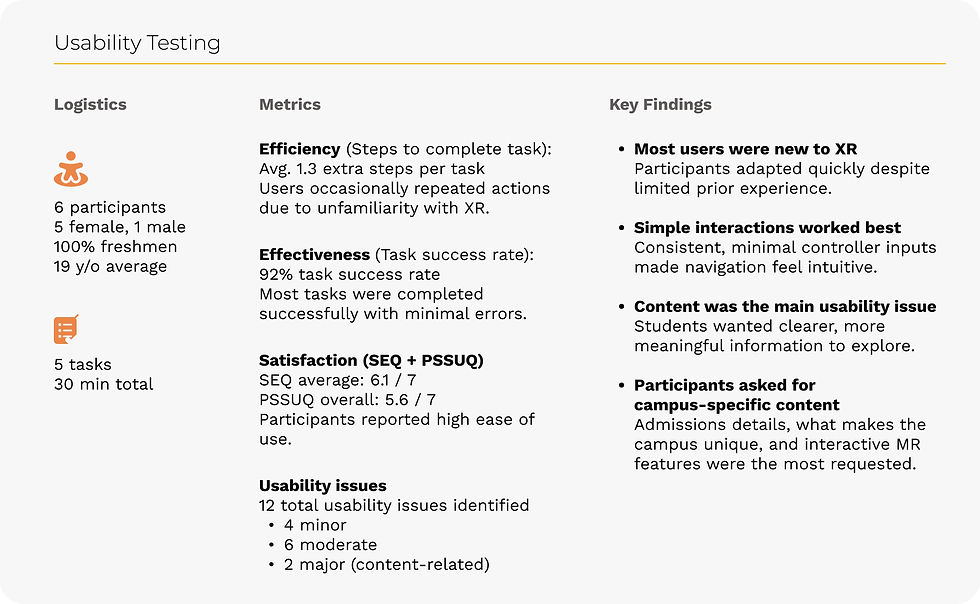
While the launch was a success, I quickly realized that "cool tech" wasn't enough. The experience felt more like a novelty than a necessary tool. To truly understand where we missed the mark, I pivoted back to research and conducted a formal usability study with six freshmen.
I led 30 minute sessions where participants completed five specific tasks. I tracked efficiency through step counts, effectiveness through success rates, and overall satisfaction using SEQ and PSSUQ surveys. Some of the key findings were:
-
The "Wow" gap: Although the usability scores were high, the "amazement" factor was missing. Students found the app easy to use but weren't fully engaged by the content.
-
Interaction barrier: Only 1 out of 6 students had ever used a Magic Leap. This highlighted a massive need for simpler, more intuitive controller interactions.
-
Content desires: The most valuable feedback came from what students didn't see. They wanted a deeper connection to what makes the campus unique, including better interaction models and more personalized student stories.
From failure to foundation
These "failures" were actually my most important design artifacts. The feedback from the usability sessions completely informed the roadmap for Version 2.0. I moved away from a generic interface and began designing the "Magicverse" layers to specifically address the curiosity and emotional needs these students expressed during testing.
Usability testing of The U Experience app v1.0
04
Stakeholder Interviews
To move beyond the "cool tech" of version 1.0, I needed to understand the actual pain points of student life. I conducted a series of interviews with key departments at the University of Miami, including the Office of Admissions and the Student Retention Office. My goal was to identify the specific programs, resources, and cultural touchpoints that are most critical for a freshman’s success but often get lost in the noise of a traditional orientation.
The strategy behind the questions I focused my research on four key areas:
-
What are the most common anxieties of recently admitted students?
-
How can we align the app’s content with existing university retention goals?
-
What unique campus experiences or traditions foster the strongest sense of belonging?
-
Which physical locations on campus are most vital for a new student to discover?

Key findings from the interview phase
05
Establishing a Spatial Design System
Designing for Mixed Reality presents a unique challenge: traditional 2D tools like Figma aren't built for a 3D environment. To bridge this gap, I developed a custom wireframing template specifically for the Magic Leap. I needed a way to communicate depth, spatialized audio, and embodied interactions to my developer and stakeholders without ambiguity.
My template moved beyond flat screens to include three critical viewpoints for every interaction:
-
Eye-level perspective: To visualize the scale and placement of UI elements within the user’s immediate field of view.
-
Top-down map: To define the precise distance between the user and virtual objects, ensuring they remained within a comfortable "interaction zone."
-
Controller interactions: Detailed annotations for trigger haptics and gestures, ensuring the "hand-to-object" connection felt natural.
Iteration & Documentation
Using a combination of Figma for UI and Adobe Dimension for quick 3D rendering, I refined this template throughout the project. By documenting the "Magicverse" logic, including how layers would stack and transition, I created a clear roadmap that allowed us to move from abstract concepts to a functional, high-fidelity prototype with minimal technical friction.


Wireframes sample
The final concept
To move beyond the static map of Version 1.0, I designed a multi-layered storytelling environment built on the physical LIDAR scans of the campus. I transitioned the concept of the Magicverse into five distinct layers, each with a unique visual style and set of interactions designed to address the specific concerns students shared during testing. By layering personal memories, campus traditions, and physical resources onto the map, I transformed a technical tool into an engaging storytelling experience. This approach moved the app from a simple novelty to a meaningful way for students to build a real connection with the University.


The table: Physical map
After launching the app, the user scans the room and place the table for the first time. The main table hosts all the layers of the experience. On top of the controller, there is a hand that follows the movements of the user, this makes the interactions more natural.

Layer 1: Facts about The U
Interesting facts from a wide range of topics - all about The U. The visualizations were carefully designed to represent each fact. Topics include: Academics, Engagement, Research, UM Identity, Athletics, Financials, Notable Alumni, The Mascot, and a short clip about the story of the Coral Gables campus.
This layer is characterized by its "techie" interface, inspired in Iron Man! Big visualizations, numbers and a color palette of blues are the essence of the facts layer.


Layer 4: Memories
My goal was to forge an emotional bond between users and the campus. I realized the most powerful way to trigger this was through shared nostalgia, allowing users to relive authentic past experiences to deepen their connection to "The U."
I drew visual inspiration from the "memory orbs" in Disney’s Inside Out. As a huge fan, I was thrilled to translate this cinematic concept into a tangible UX feature. In this layer, users interact with Memory Spheres that, when picked up, play personal stories. These recordings were curated by a journalism class that interviewed students across campus to capture their most meaningful moments.


Layer 2: Resources available on campus
A list of available resources for students are included. They are organized in 4 categories: Academics, Personal Development, Campus engagement, and Student Diversity. The resources and their description are displayed at their physical location on the campus map.

Layer 3: Nature on campus
This layers shows wildlife and trees across campus. The trees and animals on this layer were carefully selected by experts about nature who helped us to gather this information. Users can grab trees and plant them around their own environment or grab animals and let them walk/swim/fly around them. An audio backstory plays when the user picks a nature item.
Reflections and Future Impact
This project was a deep dive into adapting a user-centered process for a completely new medium. While the initial goal was to create an orientation tool, the final result proved that Mixed Reality can fundamentally shift how we deliver complex information in educational environments. By moving beyond a "tech-first" mindset and focusing on emotional connection, we successfully defined a new interaction language for the University of Miami.
Adapting to constraints
Designing for Mixed Reality requires a completely different UX and UI vocabulary to overcome hardware limitations. Throughout the process, I focused on several key spatial principles:
-
The constraint of focus: A narrow Field of View (FOV) means elements can easily get trimmed. I constantly iterated on-device to adjust the depth and scale of content, ensuring the most critical information remained within the user's focus.
-
Haptic & auditory feedback: Because users are often distracted by the 3D environment, I implemented short controller vibrations and spatial audio. These cues catch the user's attention and make interacting with virtual objects feel grounded and responsive.
-
Simplifying for the novice: To prevent "information overload" in a high-novelty medium, I limited the controller to a single-trigger interaction. This lowered the barrier to entry for students who had never used an MR headset before.
-
Visual Fidelity: I learned that content looks drastically different on-device than on a 2D monitor. Colors appear more saturated in the headset, making it essential to check and iterate on assets while monitoring them in the actual spatial environment.
Future vision
Ideally, we would have conducted a final round of in-person testing, but when COVID-19 restricted physical access, I adapted by distributing .mpk files to remote users and advisors for feedback. This agility allowed us to finalize a version that now serves as a reference for future spatial learning, from adding new data layers to exploring multi-platform VR testing.
By scaling this prototype to reach 2,800+ students annually, we provided the University with a forward-thinking framework for student retention. Most importantly, I’ve walked away with a refined, flexible design process that I can now apply to any "zero-to-one" challenge, regardless of the technology involved.


The final app was promoted on different social media by the contributors on this project and official University of Miami acounts.


